You have found the file and are about to click the "Install" button, but suddenly a thought appears: will it work on my phone? This is a valid question to ask at the beginning. The majority of problems related to applications are caused by their incompatibility with devices. A very old phone, a phone with no free space, or improper system settings will not allow the app to perform its functions correctly, even if the user follows all instructions carefully.
The current article explains how the BetPro exchange app for Android works with various devices. You will also find out which factors are worth paying attention to before installing the application, how to check your device in two minutes, what differences between low-, mid- and high-range smartphones can be ignored and what features are essential. All information is provided for users in Pakistan who use Android OS, starting from a decade-old Samsung to a new Infinix smartphone.
Why Compatibility Matters More Than You Think
An APK is a package for the Android system. The package has specific system requirements, including a minimum Android level, memory available for the application, a suitable processor type and space to unpack the application. If the requirements are not met, there might be issues installing the APK or, after installation, the application might crash immediately on launch or be unreasonably slow.
A trading application that operates in real-time has much more stringent requirements. The screen with prices and market data updates every second and the market data changes constantly. Hence, it can be dangerous to use an incompatible APK - there is a possibility of seeing old market data instead of current prices. Time spent checking APK requirements will save both data and time and prevent frustration.
The Five Specs That Decide Everything
You do not need to be technical. Only five things matter.
1. Android Version
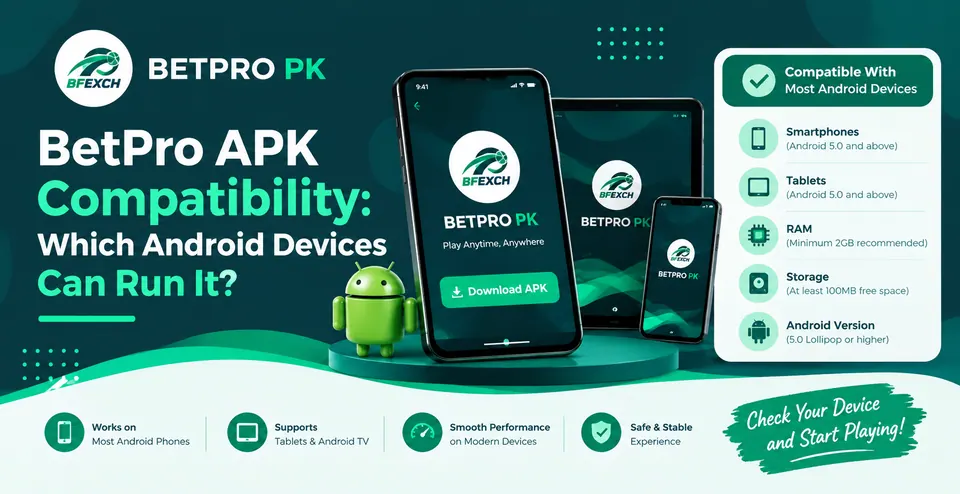
This is probably the most relevant consideration. Android systems are numbered in versions and each subsequent one introduces new features and security upgrades needed for the latest apps. As a rule of thumb, the BetPro crypto app works best on Android 7.0 or higher and the most stable versions are Android 10 and above.
Android 5 and 6 have problems with modern encryption, so you might experience login freezes and script failures on smartphones. If you have a smartphone with an android version lower than 7, it is recommended that you update your system before launching the app.
2. RAM (Memory)
The amount of RAM on a device dictates how much it can handle when other apps are running in the background.
2 Gigs of RAM: It'll work, just not very smoothly. It's best to close everything you don't need first before opening the app.
3-4 Gigs of RAM: Perfect!
More than 6 Gigs of RAM: You've got plenty of memory, so you can do whatever you want!
If you have 2 gigs of ram or lower, you should be extra careful not to have too many apps running in the background and to organize your app screen so you don't hurt your phone's performance when using the said app. Also, try not to have social media apps running in the background too when you're trying to open the app mentioned above.
3. Free Storage
The APK file size itself is significantly smaller than that the application will take up once installed because it has to unpack files, store cache, and accumulate data. You need at least 500 MB to 1 GB of free space to avoid the phone from freezing during the app's installation. Having 95% of the phone's memory filled is a common cause of sluggish performance.
4. Processor Architecture (32-bit vs 64-bit)
Mobile phones have 32-bit or 64-bit processors. Most devices today are 64-bit or run both 64-bit and 32-bit apps. However, older or budget phones tend to be 32-bit only. So, if you compile your APK purely for 64-bit, it will not run on older 32-bit devices. You can check if your device is 64-bit by downloading one of the free CPU utilities, such as CPU-Z or AIDA64, from Google Play.
5. Screen Size and Display
Modern apps adjust to different screens, but very small displays (under 4.5 inches) or unusual resolutions can make menus feel cramped. Phones with 5.5 inches and above give the best layout for reading markets and buttons.
How to Check Your Phone in Two Minutes
No equipment is required, only a simple procedure.
Go to Settings and select About phone.
Write down the Android version.
Check how much RAM you have (it can also be listed under "Memory" or "Device info").
Go back to Settings and select Storage to view the amount of space available.
Install CPU-Z if you want to check if it's 32-bit or 64-bit.
If your Android version is 7 or newer, you have at least 2 GB of RAM and at least 1 GB of space, then your phone is very likely to be able to run it.
Brand-by-Brand Compatibility Notes
Android phones from different makers behave a little differently. Here is what Pakistani users commonly run into.
Samsung (Galaxy A, M and S series)
Samsung phones are one of the most compatible devices. All the devices starting from Galaxy A10 should work fine with the apps. However, there is one thing to consider – Samsung’s security layer may show some warnings for apps not installed from the Play Store. These warnings are nothing to worry about, but it is essential to go through each warning and understand what is going on.
Infinix, Tecno and Itel
These brands are by far the most popular on the Pakistani market for affordable smartphones. Their representatives tend to release the most powerful devices from the low-range series (Infinix Hot, Note and Smart, Tecno Spark and Camon). One should be especially careful about the amount of RAM in the entry-level models since they may have only 32 GB, which is enough to be filled with texts and applications in a short time. Some producers utilize advanced power management technologies that can close the apps that stop being used, so one should add the necessary ones in the list of “background processes.
Xiaomi, Redmi and Poco
Xiaomi’s MIUI and HyperOS add extra permission screens. If something does not behave as expected, check the app’s permissions and auto-start settings. These phones usually have strong hardware for the price, so performance is rarely the issue.
Oppo, Vivo and Realme
These brands also add their own security checks and background limits. Newer models are fine. On older Oppo and Vivo phones, keep an eye on pop-ups from the built-in security manager.
Huawei and Honor
Phones released without Google services can be more complicated. The device may still run the app, but features depending on Google components may not work. Check your phone’s setup before expecting identical behavior to a standard Android device.
Google Pixel, Motorola and Nokia
Nearly stock Android, which means fewer surprises. These are generally the easiest devices for app compatibility.
Budget Phones: Can They Handle It?
Yes, in most cases. You do not need a high-end smartphone: a properly maintained device with 3 GB of RAM and a recent Android version will cope. The main thing is to keep your device tidy.
A few simple steps will free up enough space on your device to run the program smoothly. Some of these tricks are universal and suitable for any Android phone:
Clearing the cache of some intensive apps (social networks, browsers)
Deleting old videos and junk files.
Restarting the device every day or every other day.
Not using heavy apps (especially games) with the app.
Turning off power-saving modes that reduce performance.
Tablets, Emulators and Other Devices
Android tablets can generally be operated if they meet the same Android version and RAM requirements, even though the interface may stretch on large screens.
PC emulators, however, are a different story. These programs imitate the functionality of an android phone on a computer and their results can be unpredictable. Some apps restrict their features when they are not run on the preferred device for security reasons, so if you are concerned with security and performance, it is best to stick with a physical android phone.
iPhone tablets, or iPads, cannot open APK files because APK is a file type specific to Android systems.
Compatibility Is Not Only About Hardware
Even a perfectly capable phone can fail if the surrounding conditions are wrong. Watch out for these.
Date and time settings. If your phone’s clock is wrong, secure connections can fail, which looks like a login or loading problem. Set date and time to automatic.
Internet quality. A weak connection can mimic a compatibility problem. Test on both Wi-Fi and mobile data. In areas with unstable networks, switching between the two often reveals the real cause.
Google Play Protect. Android’s built-in scanner may flag apps from outside the Play Store. Understand what the warning is saying before deciding how to proceed and only continue if you trust the source.
Outdated system WebView. Some app screens rely on the Android WebView component. Updating it through the Play Store can fix blank or broken screens.
Source Matters as Much as the Device
Another thing to note is the file itself; an altered, modified, outdated or repackaged version of the apk could potentially not work as intended on your phone, even if they worked well for someone else. It is best that you download the file from your desired source, and avoid any random links that could be shared in chats or social media groups. You must not share your passwords or OTP codes with anyone that messages you, and you should always keep your phone's security features active.
If you have not installed yet, our step-by-step guide on the betpro app download apk process walks you through setup once you confirm your phone is compatible.
What About Updates?
Compatibility is not permanent. As Android and the app both evolve, a phone that worked last year might need a system update this year. Keeping your device and app current prevents most slowdowns and security issues. If you want to stay on the newest build, read our guide to the betpro app download latest version for android so you update safely without losing your data.
Quick Compatibility Checklist
Before installing the program on your device, make sure that your phone meets the following requirements:
Android 7.0 or higher (preferably Android 10 or higher)
At least 2 GB of RAM (3 GB or more is preferable)
500 MB to 1 GB of free space
64-bit processor (recommended)
Automatic date and time (enabled)
A stable internet connection
Download the file from the required source
If all the above requirements are met, then your device is suitable for installation.
Overview of the BetPro App for Android
If you want the bigger picture on what the app offers and how it is positioned for Pakistani users, our overview of the betpro app for android is a good companion to read this guide.
After Installation: Setting Up Your Account
Once the application starts to operate properly, it is time to create your profile. To avoid profile verification issues, it is advisable to provide the correct information, a trustworthy phone number (that can actually be contacted), and a resilient password (not used on other platforms). For a clear walkthrough, follow our betpro account registration guide.
Important Reminder About Responsible Use
Please note, that this app is intended for adults over 18 years. The laws and regulations about online betting may differ in different countries or regions, make sure you use our apps legally within your country or region. Set your limits and never try to chase losses. Remember to bet for fun and entertainment purposes only.
FAQs
1. What Android version is recommended to run the app?
Android 7.0 or higher is recommended to run the app. For the best performance, we recommend using Android 10 or higher. On Android versions lower than 7.0, the app may not work due to security restrictions.
2. How can I install BetPro on my phone with 2 GB of RAM?
Your phone has enough RAM to run the app, but it may work unstably. Please free up some space on your phone, close all the apps running in the background, and restart your phone.
3. Is there an APK version of the app for iPhone?
No, there is no such APK version for iPhones and iPads. APK is an Android-exclusive package, which means that you can only install it on Android devices like phones and tablets.